AWS in Tel Aviv
The shared hosted services use EC2 in il-central-1, Docker services and persistent storage. This is shared infrastructure with application access controls; it is not a dedicated server or container for every conversation.
How the platform connects to your ERP, separates access, handles credentials and governs AI actions. A practical overview for your IT and security teams.
Users reach the hosted platform through Cloudflare. The gateway reaches your Priority server through the connection agreed with your IT team.
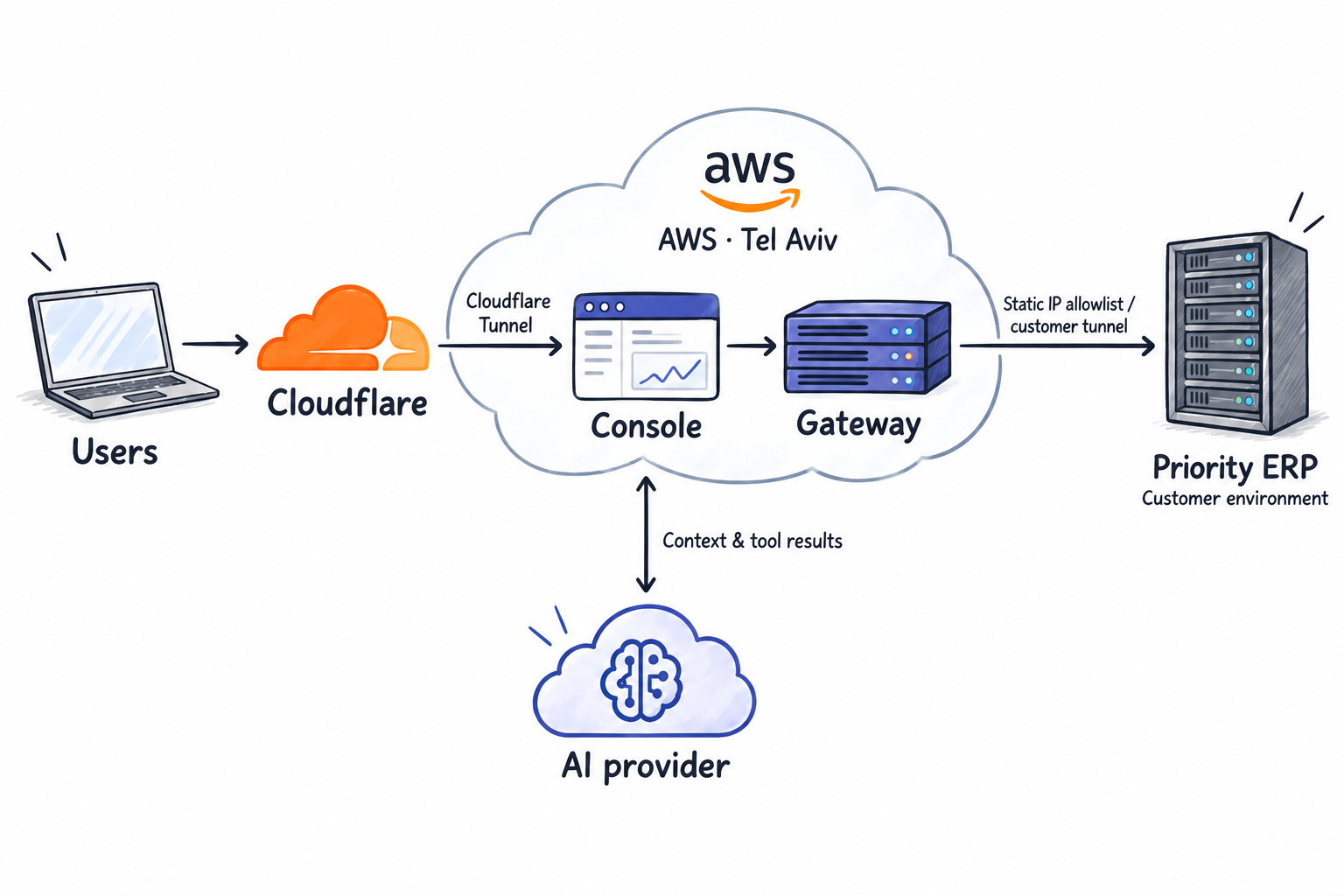
The shared hosted services use EC2 in il-central-1, Docker services and persistent storage. This is shared infrastructure with application access controls; it is not a dedicated server or container for every conversation.
The hosted origin establishes an outbound tunnel. The standard infrastructure closes public web ports and uses AWS Systems Manager for administration. Access, WAF and rate-limit rules are configured per hostname and deployment. How Cloudflare Tunnel works.
AWS Elastic IP provides a stable source address for gateway-to-Priority traffic. Your IT team can allow that address at the Priority perimeter. The approved address is supplied during onboarding; this network rule complements user authentication and ERP permissions.
Browser HTTPS terminates at Cloudflare, which connects through the tunnel to the origin. Internal service traffic uses private Docker networks. The Priority connection has separate TLS settings; strict server-certificate verification must be confirmed for the deployment, particularly with internal certificates.
Console sign-in, permission to use a product and permission to access Priority are separate checks. Hosted sign-in uses Cognito; product access is managed through the licensing service.
| Credential | Purpose | Boundary & lifecycle |
|---|---|---|
API keypk_ | A signed gateway license and access key. It carries customer identity, expiry and granted capabilities. | Customer keys can carry tenant and company restrictions and can be revoked by the operator. A key is separate from the Priority login used for a data operation. |
Connector tokengct_ | Represents a validated Priority connection and user or service identity. The gateway can recover the credentials needed for ERP calls. | Signed token with AES-256-GCM encryption for embedded passwords and secret fields. Connection metadata remains readable. Expiry and registry revocation are checked, together with key binding when present; treat the whole token as a credential. |
Login sessiongws_ | An opaque gateway session token issued after Priority login, where session authentication is enabled. | Absolute and idle expiry, explicit logout and encrypted credential storage in process memory. Sessions are lost on gateway restart. Tenant connection fields are pinned; company selection remains subject to the applicable key entitlements. |
| MCP OAuth | Opaque access and rotating refresh tokens issued after connection consent. | Authorization resolves through the consent-bound connector identity. These tokens are separate from gct_ and the MCP transport session ID. |
| BFF session cookie | Lets a browser use an app whose backend holds the gateway credentials. | In Vercel BFF mode, the signed session cookie uses HttpOnly, Secure and SameSite=Strict. The browser does not receive the backend's gateway key or connector token. |
Execution identity depends on the route. OData and WebSDK data calls use request credentials or the verified token identity, then fall back to the tenant login default and tenant master if no user credentials were supplied. Metadata and configured service operations can use the tenant master. The gateway supports authorized writes as well as read-only SQLI queries.
The gateway operator key manages gateway access. The tenant master is a separate Priority account used for system operations and gated SQLI execution. A customer API key does not itself identify the ERP user.
The end-user path takes identity from a verified token, pins tenant and company, resolves user or group form permissions, and validates the structured query. The approved query executes through WCF using the tenant master; it does not log into WCF as the end user.
The effective tenant mode is off, shadow or enforce. Only enforcement turns permission denials into blocking decisions. Do not assume that a disabled gate inherits the caller’s Priority permissions. Administrative raw SQL requires separate authorization.
Form access, discovered physical fields and supported joins constrain generated queries. This does not reproduce every screen predicate, row restriction or field permission. Applications with narrower data-access rules need additional verified server-side controls.
The operational Chat route has a narrower toolset than Dev or App Generator. These restrictions are enforced by the application as well as described in the assistant's instructions.
A tool request returns to the Console. The application checks it before any ERP execution:
Conversation access is scoped to the authenticated tenant and user. PostgreSQL also supports tenant row-level policies when enforcement is enabled. Authorized operators have oversight tools for support and review; containment does not mean that platform administrators cannot access stored conversations.
Operational Chat removes shell and development-authoring tools. Its permission broker checks tool calls and requests approval for mutating ERP operations. Writes through Priority forms retain their business validations and triggers. Dev and App Generator have different capabilities and approval policies.
The hosted Console stores connection secrets encrypted and supplies them to the gateway server-side. They are not delivered as Chat browser configuration. This differs from an external MCP client or a standalone app that deliberately receives its own bearer token.
The configured AI provider processes prompts, conversation context, supplied attachments and relevant ERP results. Conversations are also stored by the platform. Hosting the platform in Israel does not establish Israel-only processing by the AI provider.
AI data terms depend on the connected account. The Console can use API credentials or supported subscription credentials, depending on deployment policy. Training preferences, provider retention and processing locations must be confirmed for that account and service. This brief makes no universal no-training or zero-retention claim.
A Backend for Frontend (BFF) holds the application's gateway credentials and forwards approved requests. The deployment mode determines which controls apply.
pk_ and gct_ on the server. Checks session, origin, route and method.Allowed request + pk_ / gct_ → Gatewaypk_ / gct_The key grants gateway access; the connector token represents the Priority connection. Both remain on the BFF server in this mode.gws_Apps with individual Priority login can use a gateway session token. It is not the BFF cookie; it has its own expiry and logout.The published function stores the connector token, restricted gateway key and session-signing secret in server-side environment variables. Browser configuration leaves gateway credentials empty. The proxy checks origins, allowed routes and methods, and refuses attempts to replace the configured gateway connection.
Contact mode validates a contact password and issues a session cookie. Employee mode provides identification without a password; an app declared with no login is public. These choices need to match the data the app exposes.
The Vercel BFF controls login and API routes; it does not enforce per-customer or per-supplier row filtering. Apps that require users to see only their own records need verified server-side data authorization. A filter in the browser is not an authorization boundary.
Apps that log each person into Priority can use their own gateway login session. IIS BFF deployments have a separate implementation and configuration. Hosting, session behavior and data-access rules must be reviewed for the actual generated app.
Publishing checks: the pipeline removes known secret values from frontend build variables and scans staged and served text assets for exposed credentials. These checks supplement code review; the scans do not detect every possible encoded representation of a secret.
Deployment secrets are sourced from AWS Systems Manager Parameter Store and made available to authorized services through runtime configuration. Chat connection secrets are encrypted at rest. The crypto backend can use a server-managed key or AWS KMS, according to deployment settings.
The platform stores conversations, operational records and connection metadata. Gateway infrastructure defines encrypted EBS volumes. Stored transcripts and diagnostic output can contain business data; retention, deletion and operator access should be agreed for the service you use.
The committed AWS deployment sends gateway logs to CloudWatch, including worker-pool telemetry and SQLI authorization events. Some successful MCP transport requests are omitted from the main request log. Redaction, retention and alert configuration need deployment review; logs and stored chats are not a complete, tamper-proof audit ledger.
The gateway infrastructure defines daily snapshots of its data volume with 14 retained snapshots. That policy does not by itself cover every product's database or establish a recovery-time commitment. Backup coverage and restore procedures are deployment-specific.
This brief describes the reviewed architecture and supported controls. A deployment review confirms which settings are active for your organization.