n8n community node for Priority ERP

Automate Priority ERP from n8n

One node reaches every Priority surface — forms, procedures, reports, form actions, and read-only SQL with joins. Every form, field, subform, and dropdown value is discovered live from your own Priority server. Nothing is hardcoded, so nothing goes out of sync.

n8n-nodes-priority-gateway v3.17.1 7,657 downloads in 12 months · 1,715 in the last 30 days 61 published versions
Priority Gateway — WebSDK · Read
Parameters Settings Docs
1 Form listSearch
CUSTsearching your server…
CUSTOMERS Customers
CUSTPERSONNEL Customer contacts
CUSTDESTS Customer sites
CUSTOBLIGO Customer credit and obligo
2 Fields loadOptions
CUSTNAME CUSTDES STATDES PHONE EMAIL PAYDES +116 more
3 Subforms unlocked
CUSTORDERS — Open orders
Level 3 — choose a subform

Level 3 became selectable the moment level 2 was picked.

Nothing above was typed by hand. The node reads it from your Priority while you build the flow.

What Priority automation costs without a node

Three protocols, and each one stops somewhere

Priority answers on WebSDK, OData, and SQLI. WebSDK runs procedures, reports, and form actions — from JavaScript only. OData handles bulk records, but only for forms on the approved list, and it cannot join. SQLI joins across tables, and it lives in the developer console. Wiring all three by hand means three request patterns to build and then own.

Hand-typed field lists go stale

A field name pasted into an HTTP Request node is a copy of the schema, and copies drift. Every column the customer adds, every form they customize, every subform they introduce is a flow that breaks in production rather than at design time.

One node, one credential, and a field list that cannot go stale.

Five operations. Every Priority surface.

Pick the operation you want. The node picks the protocol underneath, and the gateway speaks it.

WebSDK

Form operations

Filtered reads with subforms three levels deep, row writes, and file attachments taken from binary data or a URL. Smart filters and wildcard searches live here.

ReadCreateUpdateDeleteUpload File
OData

Record operations

Bulk reads that expand parent and children in one call, deep-insert writes that create an order and its lines together, and paging handled for you.

QueryCreateUpdateDeleteUpload File
WebSDK

Procedures and reports

Run a procedure or generate a report with auto-discovered fields. Output as HTML, Excel, or PDF, with the format-template list loaded from Priority.

ProcedureReport
WebSDK

Form actions

Fire an activation against a specific row — the same button a user would press inside Priority. Its fields are discovered against the row you actually selected.

Run Form Action
SQLI

Read-only SQL

Joins, GROUP BY, and aggregates against Priority's database layer. The builder resolves the joins for you; raw mode is there when you would rather write the query yourself.

Visual BuilderRaw SQLI
On read

Attachments inline

Pull attachment columns in the same round-trip. Base64 data URIs suit one-shot consumers such as LLMs and batch jobs; gateway-proxied URLs suit UIs and large result sets.

Base64 data URIProxied URL

Six mode toggles keep the panel small. Filter Mode, Query Mode, Lookup Mode, Input Mode, Parameter Input Mode, and File Source each switch between a guided form and raw input — visual when you are exploring, raw when you know exactly what you want.

It reads your Priority, not a schema file

29 loadOptions methods and 26 listSearch methods fetch forms, fields, subforms, activations, columns, and dropdown values at design time — from the server your credential points at.

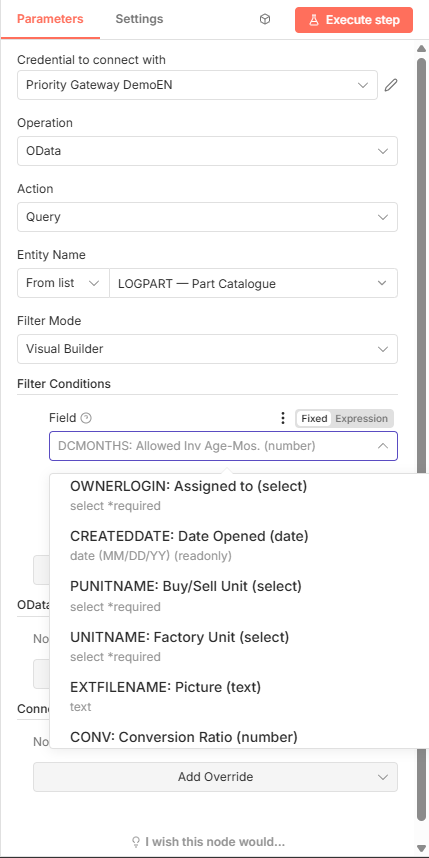
The node's parameter panel in n8n: operation OData, action Query, entity LOGPART — Part Catalogue, and an open field list showing Priority columns with their types — OWNERLOGIN: Assigned to (select), CREATEDDATE: Date Opened (date), PUNITNAME: Buy/Sell Unit (select), EXTFILENAME: Picture (text), CONV: Conversion Ratio (number).
The field list on a real server. Every entry — name, label and type — came back from that Priority, not from anything shipped in the node.

Cascading, not flat

Sub-subform options appear once the parent is chosen. Form-action fields are discovered against the row you selected. Report format templates surface once a valid key is supplied. Each choice narrows the next one.

Values, not just names

A dropdown carries the values Priority itself would offer, each marked with what it is: the default, a fixed Choose list, a searchable lookup, or a yes/no flag. You pick from the real set instead of guessing a code.

Answers while you type

The entity-name gate answers half-typed prefixes from a cached index. That matters because n8n discards option requests that are still in flight: without the cache, a dependent dropdown goes blank while you type.

Filters without an operator dropdown

Type the comparison into the value itself. The node translates it for whichever backend the operation uses.

You typeIt means
>=100at least 100
<>ABCanything except ABC
SO*starts with SO
1..100between 1 and 100

WebSDK receives a LIKE, OData receives contains() or startswith(), and a range becomes a from-value and to-value pair. One syntax, three translations.

Joins you did not have to write

Priority's OData and WebSDK cannot join. The SQLI builder walks the form cursor's join graph, takes the shortest path between the tables your chosen columns live on, and writes the join itself.

You pick
Form
ORDERS
Columns
CUSTDES under CUSTOMERS
Aggregates
COUNT(*), SUM(TOTPRICE)
Group by
CUSTDES

Columns from joined tables appear in the same dropdown, grouped under the table they belong to. Picking one adds the join.

The node sends
SELECT CUSTOMERS.CUSTDES, COUNT(*), SUM(ORDERS.TOTPRICE)
  FROM ORDERS, CUSTOMERS
 WHERE ORDERS.CUST = CUSTOMERS.CUST
 GROUP BY 1
FORMAT;

_meta: { generatedSql, executionTime, rowsReturned }

Read-only by construction. The gateway rejects every mutating verb before a query leaves the building, so a SQLI step cannot write to the ERP even if someone asks it to. Raw SQLI mode is the escape hatch when you would rather compose the query yourself, and it is read-only too.

Procedures that ask questions, answered in advance

Priority procedures stop on confirmation dialogs. A scheduled flow has nobody to press Continue, so you decide the answers while you build it.

Dialog 1 First confirmation the procedure raises Confirm
Dialog 2 Second confirmation Confirm
Dialog 3 Third confirmation Cancel
Dialog 4+ Anything the procedure raises beyond your list Dialog Policy

Dialog Policy sets the default for the whole run: auto-confirm, auto-cancel, or fail. Dialog Responses override it in order — entry number three answers the third dialog.

Reports that come out the right shape

Choose HTML, Excel, or PDF, and pick from the format templates Priority actually offers for that report. A Word template selects Word PDF on its own. Reports with a second parameter page are handled as a normal step, not a workaround.

Three levels deep, in one step

Parent, subform, and sub-subform on a WebSDK read, an OData expand, or a deep-insert write. Each level takes its own columns, its own filter, and its own AND/OR logic.

One credential. No Priority password in n8n.

A connector token carries the whole Priority identity, so the credential form asks for three things and hides the rest.

Priority Gateway API
Gateway URL
https://your-gateway/api/v1
Gateway Key
pk_••••••••••••••

Also fills the Company dropdown.

Connector Token
gct_••••••••••••••
Test ✓ Connection successful

Everything else sits behind the Advanced toggle.

What the token carries

Server, tabulaini, user, language, and any App or Cloudflare Access keys it was minted with. No other Priority field is needed, and no Priority password is stored in n8n.

Mint one yourself at <gatewayUrl>/connector. It lasts 365 days, and revoking it takes seconds.

Per-node Connection Overrides — 14 of them — let one flow reach a second company or a test environment without a second credential.

Written by the node itself

An AI agent can author the workflow

The node generates its own authoring spec — 26 sections, emitted from the node's own parameter definitions, so it cannot drift from what the panel accepts. The gateway serves that spec to any LLM.

▸ You     Build me an n8n flow that pushes new web orders
          into Priority and runs the confirmation procedure.

  Claude  priority_discover(action: "n8n_node",
                    params: { section: "envelope,op-websdk-create" })

          → node type, typeVersion, parameter template,
            and the runtime rules for filters and pickers

          Three nodes written. Paste them into n8n.

Point an agent at GET /api/v1/n8n-guide, or let an MCP client call priority_discover({action:"n8n_node"}). It writes a working workflow JSON without opening the editor.

60 seconds to your first row

Install it the way your n8n runs, paste three fields, and import the example.

n8n Cloud

Install from the community-nodes screen

Settings → Community Nodes → Install, then search for n8n-nodes-priority-gateway. The node appears on the canvas straight away.

Self-hosted

Install from npm

Run npm install n8n-nodes-priority-gateway inside ~/.n8n/nodes, then restart n8n.

One prerequisite: a running Priority Gateway. One gateway serves every n8n instance you have, and it is what puts WebSDK, OData, and SQLI behind a single credential. The node never talks to Priority directly, so no Priority SDK is installed on the n8n host.

One Priority behavior worth knowing up front: a WebSDK read with no filter returns zero rows. That is Priority, not the node — the SDK fetches rows only once a filter has been applied. The shipped example starts with a filter for exactly this reason. OData Query has no such requirement.

Then run the example

The package ships a workflow you can import as-is.

Fileexamples/workflows/websdk-read-filtered.json
What it doesReads CUSTOMERS, filtered on CUSTNAME with SO*
To run itImport, select your credential, press Execute

Where it stands today

Downloads are the only third-party number we have, so they are the only one we quote.

7,657
downloads
trailing 12 months
1,715
downloads
last 30 days
61
published
versions
208
commits
since February 2026

npm figures fetched 8 August 2026. Roughly a fifth of the year's downloads landed in the last month. MIT licensed, published as n8n-nodes-priority-gateway.

Where the gateway runs

The node runs in your own n8n. What it calls is the Priority Gateway — hosted for you on Amazon Web Services, or installed on your own network as a single Windows service.

Hosted on AWS

The hosted gateway runs in Amazon's Tel Aviv region, deployed from a versioned pipeline. Secrets live in AWS Parameter Store, encrypted, never in a database or a config file.

Cloudflare in front

Every call your workflow makes arrives through Cloudflare: TLS, DDoS protection, a web application firewall, rate limiting and bot filtering, plus caching and routing that shorten the trip.

No open front door

The servers accept no inbound connections. They dial out to Cloudflare and traffic comes back down that tunnel, so there is no public port to find and nothing to scan. Admin surfaces sit behind a second gate.

Running the gateway on your own premises? It ships as a single Windows service, and the same Cloudflare model is how a cloud-hosted n8n reaches it — without opening a port on your network.

Part of the Priority AI-Tools suite

The node is one caller of the Priority Gateway. The same gateway and the same revocable token serve the rest of the family, and one registration provisions all of it.